
Why Developers Blamed Marketing for the Website Performance Drop
Website performance problems rarely start with one catastrophic mistake. More often, developers, marketing teams, and SEO specialists slowly create performance regressions together through releases, tracking scripts, frontend updates, and third-party integrations that quietly damage Core Web Vitals over time.
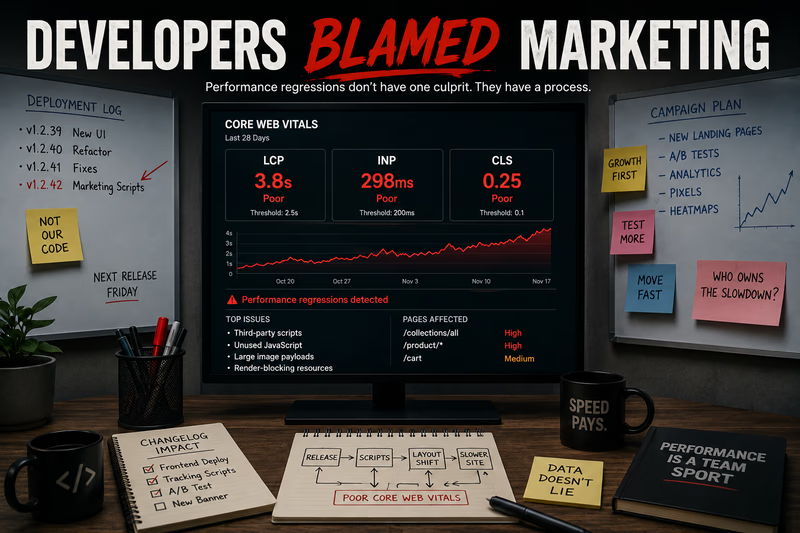
The website got slower, and every team was sure it wasn’t them. In reality no single team caused it: developers, marketing, and SEO all added reasonable changes that quietly stacked up into a cross-team performance regression. Here’s how that plays out, and why continuous Core Web Vitals monitoring is what finally ends the blame game.
It started with what looked like a fairly normal SEO report. The agency prepared a website audit report tool export for the client, reviewed Lighthouse scores, checked Search Console Core Web Vitals data, and flagged several templates where mobile performance had noticeably declined over the previous few weeks.
At first nobody inside the company seemed concerned. The homepage still loaded quickly, desktop scores looked acceptable, and recent deployments had passed QA without major issues. But the SEO team kept noticing strange patterns on deeper pages. Some product pages had become visibly slower on mobile. Filters responded inconsistently, layout shifts appeared during loading, and several templates were quietly failing Core Web Vitals thresholds even though nobody remembered introducing major frontend changes.
That’s where it got tense. Developers blamed marketing for continuously adding third-party scripts, tracking systems, and personalization tools, while marketing insisted recent frontend releases had already made the site unstable before the new integrations went in. The SEO agency was stuck in the middle, trying to explain why performance was clearly getting worse even though every department believed its own changes were harmless.
Why these situations happen so often
Most regressions aren’t caused by one catastrophic mistake. Large sites usually get slower through dozens of smaller decisions made by different teams over time. Marketing adds analytics platforms, retargeting systems, A/B testing tools, recommendation widgets, and conversion tracking, because each integration promises better attribution or conversion visibility. Meanwhile developers keep shipping frontend updates, redesigning components, and rebuilding templates under aggressive deadlines.
Individually, most of these decisions seem completely reasonable. The problem shows up when they all start interacting inside the same website. A recommendation engine slightly increases rendering time. A frontend update adds heavier JavaScript bundles. A third-party integration delays interaction responsiveness on mobile. A new analytics script hurts layout stability across product pages. Nobody notices right away because the site still technically works, but several releases later the platform is quietly slower and less stable than before.
Why SEO reports often fail to explain the real problem
This is where many companies hit the limits of traditional website SEO report software. A static report can show that performance problems exist today, but it rarely explains exactly when the degradation started. A Lighthouse report Google audit may look completely different from real-world user data collected over time in Search Console Core Web Vitals reporting. And on large ecommerce sites, different templates behave completely differently: the homepage may still perform well while hundreds of product pages quietly accumulate rendering problems after every release. This is one reason isolated reports and occasional website SEO report generator exports are no longer enough. The bigger the platform, the harder it is to track manually how releases affect performance over time.
Why product pages usually suffer first
On ecommerce sites, product pages are usually where problems surface first. They tend to carry the largest concentration of third-party systems anywhere on the site: reviews, recommendation widgets, analytics tools, dynamic pricing, inventory integrations, tracking scripts, chat widgets, and personalization engines all competing for browser resources at once. A homepage may still look healthy while deeper product templates get slower after every deployment. That creates a dangerous false sense of stability, because teams keep shipping while mobile users already deal with unstable layouts, slower interaction, and inconsistent rendering.
Why Core Web Vitals monitoring changes the conversation
The interesting part is that these internal conflicts get much less emotional once teams have historical visibility. When companies continuously monitor Core Web Vitals across important templates, the discussion becomes far more objective. Instead of arguing from assumptions, teams can actually see when performance regressions started, which releases affected mobile responsiveness, which templates became unstable, and whether new scripts hurt product page performance over time. At that point the conversation stops being political and becomes operational. That’s usually when companies realize performance isn’t just a developer problem or a marketing problem. It’s a visibility problem.
What the blame game really reveals
Most websites don’t suddenly get slow because one person made a terrible decision. Degradation usually happens when multiple teams make perfectly reasonable decisions without seeing how those changes affect the site as a whole. Developers focus on shipping features quickly, marketing focuses on attribution and conversion tracking, and SEO tries to protect rankings, Core Web Vitals, and user experience somewhere in the middle. Without continuous Core Web Vitals monitoring, all three groups eventually blame each other, because by the time the problems become visible, nobody remembers exactly when they started. Continuous performance monitoring closes that gap by showing which pages changed and the run where the decline first appeared, while everyone still remembers what shipped.